

The 2024 Kia Telluride continues to set the benchmark for three‑row family SUVs, blending a confident V6 powertrain with a tech‑rich cabin and a comprehensive suite of driver‑assist features. This guide distills the factory owner’s manual into a practical, search‑friendly reference you can keep bookmarked — whether you’re a first‑time buyer, a seasoned Telluride owner, or a service advisor looking for quick specifications. For a broader look at the segment, see the latest SUV insights.
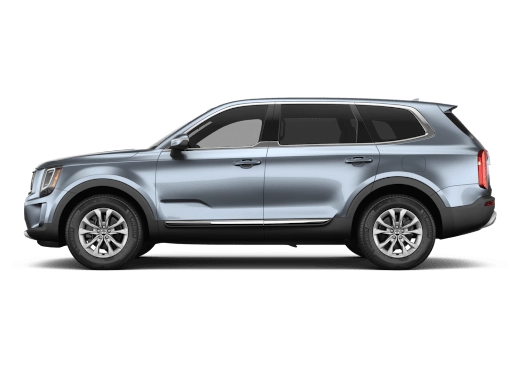
Front three‑quarter view of the 2024 Kia Telluride
Quick Access to the Digital Owner’s Manual
Kia no longer ships a bulky paper booklet; the full manual lives online and in the Kia Connect app.
- Web portal – Visit the Kia Owner Portal, sign in with your VIN, and download a searchable PDF (≈ 12 MB).
- Kia Connect app – After pairing your phone, tap “Vehicle” → “Owner’s Manual” for an interactive version with jump links to each chapter.
- QR code on the driver’s door jamb – Scanning it opens the same PDF on any mobile browser.
Keeping the digital copy on your phone means you can lookup torque specs, warning‑light meanings, or the maintenance schedule while standing at the pump or in the service lane. You can also read our guide on evaluation of suv.
Vehicle Overview & Key Specifications
| Specification | Detail |
|---|---|
| Engine | 3.8 L V6, 291 hp @ 6,000 rpm, 262 lb‑ft @ 5,200 rpm |
| Transmission | 8‑speed automatic with Sportmatic® shift logic |
| Drivetrain | Front‑wheel drive (standard) / All‑wheel drive (optional) |
| Seating | 8‑passenger (2‑3‑3) or 7‑passenger (2‑2‑3) with second‑row captain’s chairs |
| Cargo volume | 21 cu ft behind 3rd row / 46 cu ft behind 2nd row / 87 cu ft with both rows folded |
| Towing capacity | 5,000 lb (properly equipped with Class III hitch) |
| EPA fuel economy | 20 mpg city / 26 mpg hwy / 22 mpg combined (FWD) |
| Ground clearance | 8.0 in (FWD) / 8.2 in (AWD) |
| Wheelbase | 114.2 in |
| Overall length | 196.9 in |
Understanding the SUV evolution timeline helps contextualize the Telluride’s design philosophy — roomy, refined, and ready for both school runs and weekend trailers.
Getting Started: Essential Controls & First‑Drive Checklist
Before your first mile, run through this quick checklist:
- Push‑button start – Press the brake pedal, then the ENGINE START/STOP button. The instrument cluster illuminates a green “READY” indicator.
- Electronic gear selector – Rotate the dial on the center console; “P”, “R”, “N”, “D” appear on the 12.3‑inch digital cluster.
- Electronic parking brake (EPB) – Pull the switch upward to engage; push down to release. The EPB auto‑engages when the vehicle is shifted to “P”.
- Drive Mode Select – Choose among Smart, Eco, Sport, Snow, and Off‑Road (AWD only) via the console switch. Each mode remaps throttle, transmission, and AWD torque split.
- Head‑up display (if equipped) – Adjust brightness and content through the infotainment settings menu.
If you’re new to the class, the SUV definition basics are a good refresher on terminology like “approach angle” and “breakover angle.”
Safety Suite: Advanced Driver‑Assistance Systems (ADAS)
The 2024 Telluride earned a five‑star overall rating from NHTSA safety ratings. Every trim includes the following core systems, all configurable in the “Driver Assistance” menu:
| System | Function | Activation / Customization |
|---|---|---|
| Forward Collision‑Avoidance Assist (FCA) | Detects vehicles, pedestrians, cyclists; applies autonomous emergency braking if the driver doesn’t react. | Sensitivity: Early / Normal / Late; audible alert volume. |
| Blind‑Spot Collision‑Avoidance Assist (BCA) | Radar monitors adjacent lanes; visual icon in side mirrors + steering‑wheel vibration. | Can be set to “Warning Only” or “Active Assist.” |
| Lane Keeping Assist (LKA) | Gentle steering torque to keep the vehicle centered; works above 40 mph. | Adjust “Assist Level” (Low/Medium/High). |
| Smart Cruise Control (SCC) with Stop & Go | Maintains set speed and distance; resumes automatically in traffic. | Set following distance (1‑4 bars). |
| Rear Cross‑Traffic Collision‑Avoidance Assist (RCCA) | Alerts when reversing out of a parking space; can apply brakes. | On/Off toggle. |
| High Beam Assist (HBA) | Auto‑switches between high/low beams based on oncoming traffic. | Default on; can be disabled. |
All ADAS features rely on the front‑facing camera, radar, and ultrasonic sensors — keep the windshield and front grille clean for optimal performance. You can also read our guide on kia suv hybrid.
Infotainment & Connectivity
The 10.25‑inch touchscreen runs Kia’s latest UVO‑based interface, supporting wireless Apple CarPlay and Android Auto.
Pairing a phone (Bluetooth)
- Enable Bluetooth on the phone.
- On the Telluride screen, go Settings → Bluetooth → Add New Device.
- Select the phone from the list, confirm the PIN, and grant contacts/message access.
Apple CarPlay / Android Auto (wired or wireless)
- Connect via USB‑C for the first wired session; the system will prompt to enable wireless projection for future drives.
- Once wireless is active, the phone connects automatically when the vehicle starts.
Kia Connect services (remote start, climate pre‑conditioning, vehicle health alerts) require a subscription after the complimentary 1‑year trial. The app also pushes over‑the‑air (OTA) updates for navigation maps, infotainment firmware, and ADAS calibration.

Kia Connect app icon illustrating remote vehicle access
Interior Comfort & Convenience Features
- Tri‑zone automatic climate control – Driver, front passenger, and rear zones each have independent temperature knobs and fan speed.
- Heated & ventilated front seats – Three heat levels; ventilation runs on a timer to avoid battery drain.
- Panoramic sunroof (optional) – Power‑slide and tilt with one‑touch open/close; includes a retractable sunshade.
- Second‑row captain’s chairs (7‑passenger config) – Offer walk‑through access to the third row and integrated armrests with cupholders.
- Power‑folding third‑row seats – Flat‑fold at the push of a button; cargo floor lowers to a near‑flat load floor.
- USB‑C ports – Two up front, two in the second row, one in the cargo area (all 3 A fast‑charge capable).
- Wireless charging pad – Qi‑compatible, located ahead of the gear selector; LED indicates charging status.
Maintenance Schedule & Service Intervals
Kia’s “Normal Service” schedule assumes typical mixed driving; “Severe Service” (frequent short trips, towing, dusty conditions) shortens intervals by roughly 30 %. You can also read our guide on history of suv.
| Service Item | Normal Interval | Severe Interval | Notes |
|---|---|---|---|
| Engine oil & filter | 7,500 mi / 12 mo | 5,000 mi / 6 mo | Use 5W‑30 synthetic (API SN Plus). |
| Tire rotation | 7,500 mi | 5,000 mi | Rotate front‑to‑rear; check pressure monthly. |
| Brake fluid | 30,000 mi / 24 mo | 20,000 mi / 18 mo | DOT 4; flush if moisture > 3 %. |
| Cabin air filter | 15,000 mi / 12 mo | 10,000 mi / 9 mo | Replace sooner in high‑pollen areas. |
| Engine air filter | 30,000 mi | 20,000 mi | Inspect at each oil change. |
| Coolant (long‑life) | 120,000 mi / 10 yr | 60,000 mi / 5 yr | Use Kia‑specified OAT coolant. |
| Transmission fluid (ATF) | 120,000 mi (inspect) | 60,000 mi (inspect) | No scheduled change unless contamination detected. |
| Spark plugs (iridium) | 100,000 mi | 60,000 mi | Replace with OEM NGK 96206. |
| Drive belts | Inspect every 30,000 mi | Inspect every 15,000 mi | Replace if cracking or glazing. |
Current market trends affect parts pricing and service costs, so budgeting a few hundred dollars annually for consumables is realistic.
Warranty Coverage & Transferability
| Warranty | Coverage | Duration / Mileage | Transferable? |
|---|---|---|---|
| New Vehicle Limited (Bumper‑to‑Bumper) | Most components, excluding wear items | 5 yr / 60,000 mi | Yes, to subsequent owners |
| Powertrain Limited | Engine, transmission, drivetrain | 10 yr / 100,000 mi | Yes |
| Anti‑Perforation (Corrosion) | Body panels, frame | 5 yr / unlimited mi | Yes |
| Roadside Assistance | Towing, lockout, flat‑tire, jump‑start | 5 yr / 60,000 mi | Yes |
| Federal Emissions | Emissions‑related parts | 8 yr / 80,000 mi | Yes (state‑specific) |
The 2024 price outlook can influence extended warranty decisions, especially if you plan to keep the vehicle past the factory coverage. For more on this, see our guide on toyota gr86 premium automatic coupe review specs features.
Towing Guidelines & Equipment
- Maximum trailer weight: 5,000 lb (with Class III hitch, 2‑inch receiver).
- Tongue weight: 10‑15 % of trailer weight (500‑750 lb).
- Required equipment: 7‑pin wiring harness, trailer brake controller (integrated on EX/SX trims), safety chains, and a weight‑distribution hitch for loads > 3,500 lb.
- Trailer Sway Control – Standard on all trims; activates automatically when sway is detected.
- Driving tips: Engage Tow/Haul mode (if equipped) to raise shift points and increase engine braking; keep speed ≤ 55 mph on steep grades; allow extra stopping distance.
Fuel Requirements & Economy
Kia recommends 87 octane (regular) unleaded for the 3.8 L V6; higher octane provides no measurable benefit. Real‑world combined figures typically land within 1‑2 mpg of the EPA fuel‑economy data, especially when the vehicle is kept in Eco mode and tires are inflated to the door‑jamb spec (35 psi front / 36 psi rear).
Software Updates & Over‑the‑Air (OTA) Process
- Ensure the vehicle is parked on Wi‑Fi (home or hotspot) and the 12‑V battery is > 50 % state‑of‑charge.
- In the infotainment menu, navigate Settings → System → Software Update.
- If an update is available, tap “Download & Install.” The screen will display progress; the vehicle may reboot several times.
- After completion, verify the new version under Settings → System → About.
OTA updates cover navigation map refreshes, infotainment bug fixes, ADAS sensor calibration refinements, and occasional powertrain control module tweaks. For further reading, see fueleconomy.gov.
Common Owner Questions (FAQ)
Q: How often should I change the oil?
A: Every 7,500 mi (normal) or 5,000 mi (severe) using 5W‑30 synthetic.
Q: What is the real‑world towing capacity?
A: 5,000 lb with the factory Class III hitch; exceed this only with aftermarket upgrades and a professional install.
Q: Does the Telluride require premium fuel?
A: No — regular 87 octane is specified; premium offers no advantage.
Q: Can I use Apple CarPlay wirelessly?
A: Yes, after an initial wired pairing the system enables wireless projection automatically.
Q: Where do I find the tire‑pressure monitoring reset?
A: In the instrument cluster menu: Vehicle → TPMS → Reset (vehicle must be stationary, ignition ON).
Q: Is the panoramic sunroof covered under the corrosion warranty?
A: The glass panel itself is not, but the surrounding body structure is covered for 5 yr/unlimited miles.
Q: How do I schedule a service appointment via the app?
A: Open Kia Connect → “Service” → “Schedule Appointment” → choose dealer, date, and preferred time slot.
Q: What happens if I miss a scheduled maintenance interval?
A: The warranty remains valid, but deferred service can accelerate wear; Kia recommends catching up at the next visit.
Owner Resources & Next Steps
- Kia Owner Portal – Central hub for manuals, service history, recall checks, and warranty documents.
- Kia Connect App – Remote start, climate, vehicle health, and OTA updates.
- Certified Dealer Locator – Find the nearest service center with genuine parts.
- Community Forums – Owner‑driven discussions on mods, troubleshooting, and long‑term reviews.
Schedule your first service appointment today via the Kia Owner Portal to keep your Telluride running at peak performance.
Conclusion
The 2024 Kia Telluride delivers a compelling mix of space, technology, and safety that few three‑row SUVs match. By mastering the digital owner’s manual, staying on top of the maintenance schedule, and leveraging the connected‑car ecosystem, you’ll protect your investment and enjoy every mile — whether it’s a daily commute or a cross‑country adventure. Keep this guide handy, refer back to the tables when questions arise, and don’t hesitate to reach out to your dealer for any clarification. Safe travels!